Oges PowerPoint Presentation: Your Foundation for Modern Visual Stories
If you have ever sat down to build a deck and felt that immediate friction—the struggle to find a layout that doesn't look like a generic corporate template from 2010—you understand the value of a tool like the Oges PowerPoint Presentation. This isn't just a collection of slides; it is a comprehensive design system built for professionals who need to communicate complex ideas with clarity and style. In the world of business and creative strategy, your visual assets are your first handshake. Oges provides a clean, creative, and simple framework that ensures that handshake is firm and impressive.
The core appeal of this template lies in its unique balance of scalability and personality. We often talk about modern typography and layout in terms of static images, but in a presentation, fluidity is key. Oges is designed to be multipurpose, meaning it adapts to the context. Whether you are a startup founder pitching for seed funding or a creative agency showcasing a new campaign, the template scales to fit the narrative. It avoids the clutter that plagues so many design assets, focusing instead on a visual hierarchy that guides the viewer’s eye exactly where it needs to go. This is practical design thinking applied to business tools.
Visual Flexibility: From Minimalist to Corporate
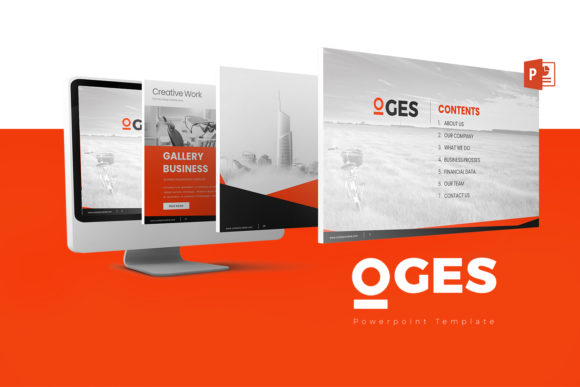
One of the most challenging aspects of building a brand identity is maintaining consistency across different mediums. The Oges PowerPoint Presentation addresses this by offering a structure that is both rigid enough to maintain order and flexible enough to allow for creativity. With 30 unique slide designs—totaling 180 slides when you factor in the variations—you have a massive library of visual solutions at your fingertips. The inclusion of both white and dark background versions is particularly useful. A dark background often lends a sense of authority and drama, perfect for evening events or high-contrast web design mockups, while the white backgrounds offer a clean, airy feel suited for editorial design and detailed data analysis.
Consider the workflow of a marketer or content creator. You are often working under tight deadlines. You don't have time to manually adjust every vector icon or wrestle with chart formatting. Oges solves this by ensuring all elements are fully editable. The charts are not just static images; they are editable in Excel. This is a massive time-saver. It means you can update your quarterly metrics in seconds without breaking the visual flow of your deck. For small business owners, this level of customization means you can treat the template as a living document, evolving it as your business grows rather than starting from scratch every quarter.
The Power of Structure and Assets
A presentation template is only as good as its assets. Oges includes vector icons and image placeholders, which are critical for maintaining a professional polish. Icons act as visual shorthand. Instead of bullet points that drone on, you can use symbols to represent concepts like "growth," "partnership," or "innovation." Because they are vectors, they scale without losing quality, ensuring your logo design elements and graphics remain crisp on any screen size, from a laptop to a conference projector.
The 16:9 aspect ratio is the current standard for high-definition displays, but the attention to detail goes further. The template emphasizes a clean aesthetic that works well with various font styles. While the template files come with recommendations for free font usage, the layout is robust enough to handle different typefaces. If you prefer a sans serif font for a tech-forward look, the spacing accommodates it. If you need a serif font for a more traditional, editorial feel, the line heights are generous enough to maintain readability. This adaptability is crucial for designers who are matching a presentation to an existing client brand book.
Practical Application and Workflow Integration
For the entrepreneur or blogger, the transition from digital content to a presentation can be jarring. Your website might have a specific vibe—perhaps using a handwritten font for headers or a script font for accents—that you want to carry over. While Oges is inherently professional, its "creative" and "simple" nature allows you to inject personality. You can use the image placeholders to feature high-quality photography that reflects your niche, whether that is crafting, tech, or lifestyle.
Let's look at a practical scenario: Packaging design or product launch. You have designed a beautiful product, and now you need to present it to retailers. A cluttered slide will detract from your work. Oges provides the negative space necessary to let your product shine. The scalable nature of the template means you can create a dedicated "lookbook" section within the deck, using full-bleed images alongside clean text blocks. This is where the premium font aesthetic of the template comes into play; it elevates the perceived value of the product being presented.
Furthermore, the documentation and quick guide included in the files are invaluable. Not everyone is a PowerPoint wizard. Having a guide that explains how to manipulate the master slides or swap out color schemes removes the technical barrier to entry. It empowers hobbyists and publishers to create professional-grade materials without needing to hire a specialist for every minor update. The support offered by the creator is also a testament to the quality of the asset; knowing you can send a message if you hit a snag provides peace of mind.
Evaluating Fit and Final Thoughts
When deciding if the Oges PowerPoint Presentation is right for your next project, consider the message you want to send. If your goal is to appear organized, innovative, and prepared, this template aligns perfectly. It moves away from the chaotic "clip art" look of the past and embraces a modern, multipurpose aesthetic. It is designed to be a workhorse—reliable, sturdy, and adaptable to almost any industry.
Ultimately, the goal of any visual tool is to remove friction between your idea and your audience. By handling the heavy lifting of layout, alignment, and asset management, Oges allows you to focus on what matters most: your story. Whether you are presenting a social media graphics strategy, a financial forecast, or a creative portfolio, having a solid structural foundation ensures your message is not just seen, but felt. It is a practical investment in your professional toolkit, designed to make you look good while you do the work you love.