Quizopia: The Ultimate Trivia Quiz Mobile App Experience
There's something electric about a perfectly designed quiz experience. The anticipation before the timer starts, the satisfaction of nailing a tough question, the friendly rivalry with a competitor—these moments stick with us. Quizopia, the Trivia Quiz Mobile App, captures that electricity and packages it into a sleek, engaging digital environment. But what truly sets it apart isn't just the trivia; it's the thoughtful design that makes every interaction feel intuitive and exciting.
More Than Questions: A Visual Playground for Knowledge
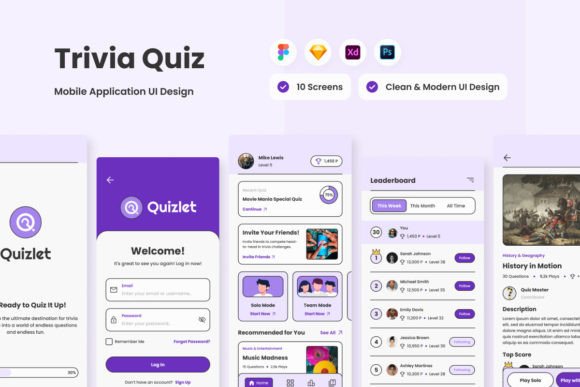
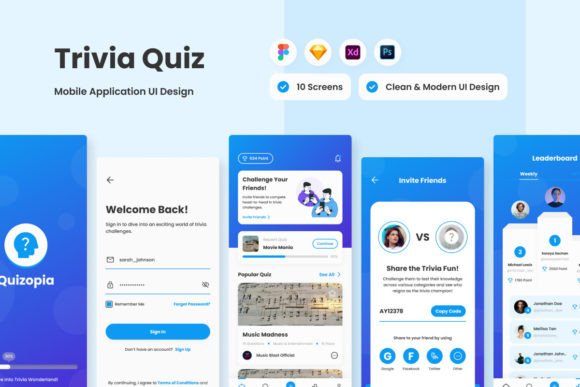
From the moment you open Quizopia, the interface communicates clarity and energy. The screen layout is meticulously crafted, balancing vibrant colors with ample white space so your eyes never feel overwhelmed. Buttons are placed exactly where you'd expect them, and transitions between questions feel smooth and responsive. This isn't just a list of queries; it's a dynamic arena where typography, color, and layout work in harmony to keep you focused and immersed. The design feels modern and approachable, striking that perfect balance between playful and professional—ideal for a wide audience of adults who want their brain workouts to feel polished, not childish.
For designers and entrepreneurs, this level of polish is a masterclass in user experience. The app demonstrates how thoughtful visual hierarchy can guide a user effortlessly through complex information. Each quiz category uses subtle design cues to set the mood—whether it's the crisp sans-serif font for science questions or a slightly more expressive display font for pop culture. This attention to detail shows that Quizopia is built not just for function, but for lasting engagement.
Design Assets That Fuel Your Creative Projects
What makes the Quizopia design kit particularly valuable for professionals is its versatility and organization. The included files—.fig, .xd, .sketch, and .psd—mean you're not locked into one design platform. Whether you're a Figma devotee, an Adobe XD enthusiast, or a Photoshop traditionalist, you can open the source files and start working immediately. The layers are neatly organized and clearly labeled, a small but critical detail that saves hours of frustration during customization.
The typography choices within the kit are especially noteworthy. The use of open-source fonts is a practical decision that respects both aesthetics and budget. These aren't generic, overused typefaces; they're carefully selected to offer personality without sacrificing readability. The global text and color styles are predefined, ensuring consistency across every screen and element. For a marketer or content creator building a brand identity around a quiz-based campaign, this means you can adapt the visual language of Quizopia to match your own brand guidelines with remarkable ease. The design is built to be adjusted, not just admired.
Practical Applications Across Industries
Imagine a blogger incorporating quiz elements into their editorial design to boost reader interaction. The Quizopia layout provides a perfect template for creating engaging, interactive content that feels native to a mobile experience. For a small business owner, the app's visual style could inspire the packaging design for a trivia-themed product line or the social media graphics for a weekly quiz series. The clean, modern typography and bold color accents translate beautifully across print and digital mediums.
The font pairings used in Quizopia offer a lesson in balance. A strong, geometric sans-serif might carry the primary information, while a complementary script or handwritten font adds a touch of personality to headings or celebratory messages. This kind of thoughtful combination creates visual interest and guides the reader's eye naturally. When evaluating any design asset, including a premium font or a complete app UI kit, always test how the typefaces perform at different sizes and weights. Does the body text remain legible on smaller screens? Do the display fonts lose their charm when scaled down? Quizopia's design passes these tests, offering a robust foundation for your own projects.
Building a Recognizable and Professional Presence
Consistency is the bedrock of brand recognition, and the Quizopia design system excels here. By using predefined color palettes and type styles, every screen within the app feels connected. This principle is directly transferable to your own work. Whether you're designing a website, a marketing brochure, or a series of social media graphics, establishing and sticking to a coherent visual system elevates your professionalism instantly. It tells your audience that you value detail and care about their experience.
The app's personality—curious, competitive, and clever—emerges from this consistent design language. It's a personality that resonates with a broad adult audience, from hobbyists enjoying a casual quiz to professionals seeking a stimulating break. This demonstrates a key lesson in brand strategy: your visual assets are not just decoration; they are the primary communicators of your brand's voice and values. Choosing assets that align with your intended personality is crucial.
When incorporating design elements like those found in the Quizopia kit, consider your commercial licensing needs. The fact that all images used in the preview are not included in the main file is a standard and important practice. It reminds us to always source our own visual content ethically, whether through original photography, licensed stock, or commissioned illustrations. This practice protects your projects legally and ensures your final product is uniquely yours.
Final Thoughts on Implementation
Start by downloading the Quizopia design files and exploring their structure. Pay close attention to how the designers organized components and managed styles. Use these observations to inform your own design system, whether you're building a mobile app, a web dashboard, or a printed magazine. Test the included fonts with your own content to see how they handle your specific copy. The true value of any design asset lies in its adaptability to your unique vision.
Ultimately, Quizopia is more than a trivia app; it's a well-executed case study in user-centered design. It proves that a knowledge playground can be both intellectually stimulating and visually delightful. For anyone in the creative or business space, it offers not just a fun diversion, but a rich source of inspiration and practical, adaptable design resources that can elevate your next project from good to exceptional.